
The Attendant can connect to cover switches on flow switch ports. These switches provide important safety and efficiency benefits by letting The Attendant “know” when a cover is closed. When properly installed and configured, The Attendant can:
- Prevent water features from running when the cover is closed
- Adjust salt water chlorinator output to safe levels when the cover is closed
This helps protect the cover, reduce unnecessary chemical use, and improve overall safety.
Wiring the Cover Switch
Run a 2-wire 18–22 AWG cable from your pool cover’s closed switch to one of The Attendant’s switch ports.
⚠️ The specific wiring method may vary depending on your cover’s make and model. Always follow the cover manufacturer’s guidelines.
Adding a Pool Cover Device in the Mobile App
- Put The Attendant into Installer Mode via the APP. .
- Open the Devices tab.
- Tap the blue PLUS (+) button to add a new device.
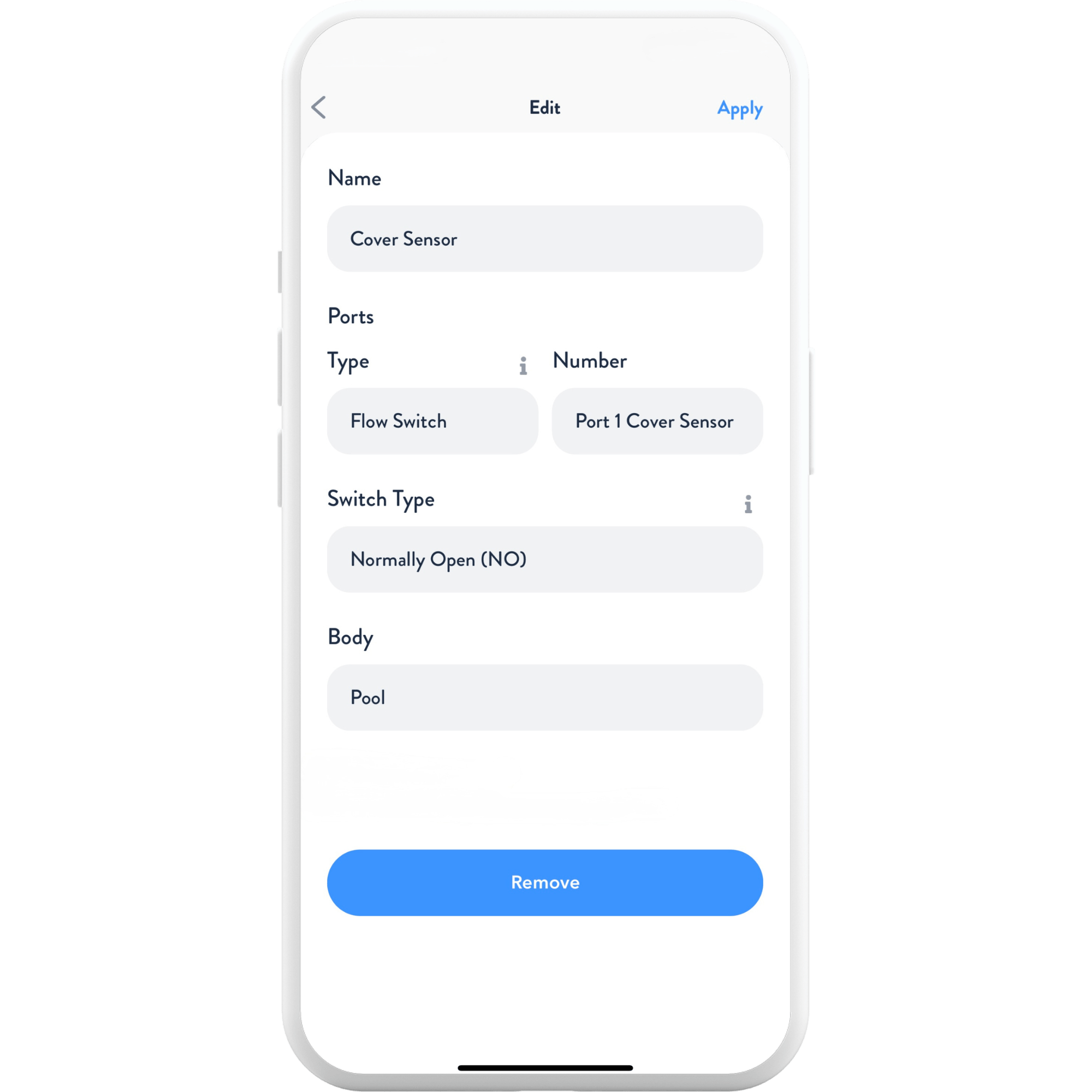
- Select Cover Sensor.
- Confirm the Port Type (should default to Flow Switch).
- Choose the Switch Number (whichever switch port you wired to).
- Set Switch Type:
- Normally Closed – circuit closed when cover is fully retracted (most common).
- Normally Open – use only if that’s how your cover is wired.
- Select the Body of Water the cover sensor applies to.
- Tap Apply, then Save.
- Exit Installer Mode and return to normal operation.
Testing the Cover
- Open the cover completely and turn on water features.
- Close the cover and confirm those water features turn off and cannot be turned back on.
- Reopen the cover and reactivate water features.
Allowing Water Features to Run or Not Run When the Cover is Closed
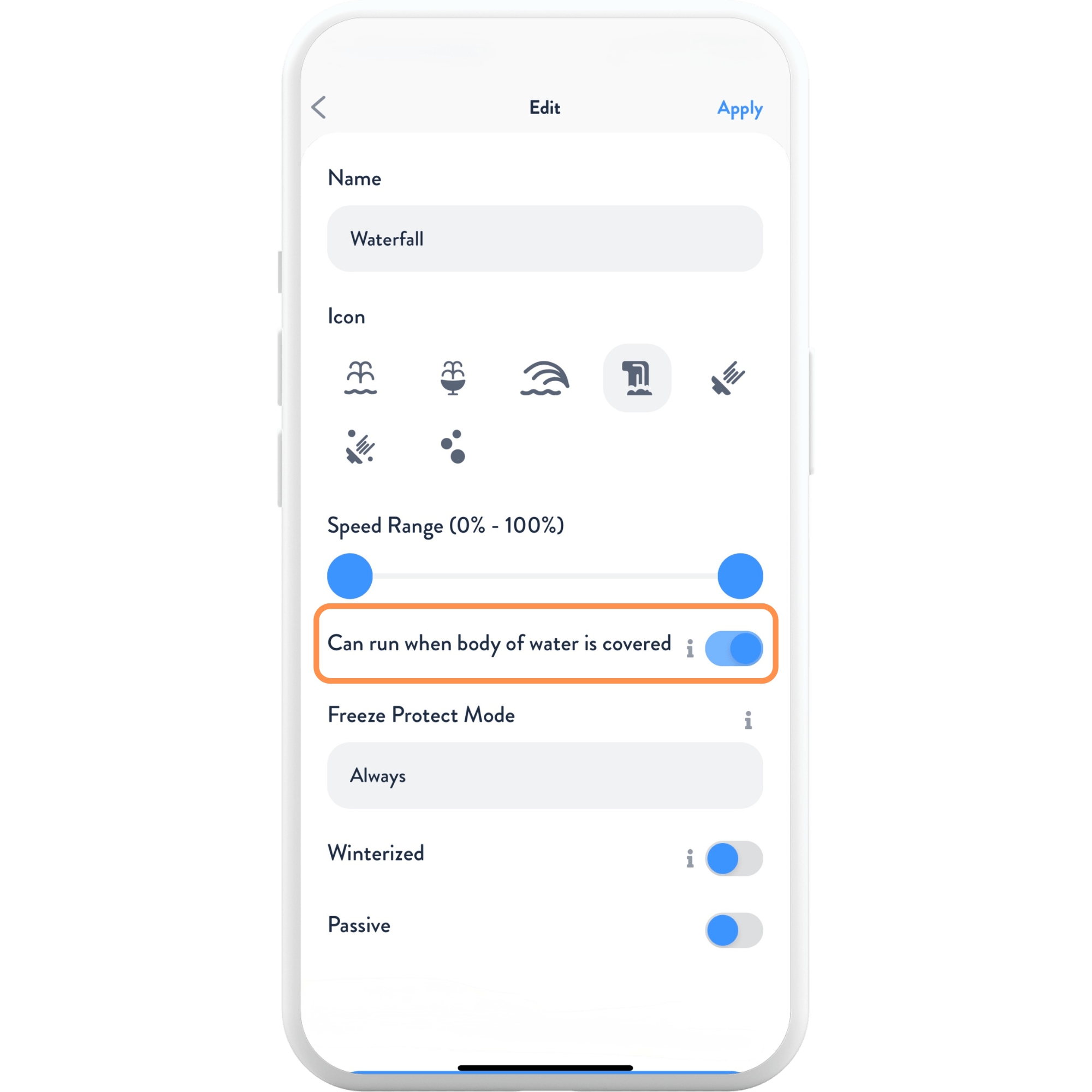
- Enter Installer Mode and tap Site at the top of the screen.
- Scroll down to Water Features.
- Select the water feature you want to adjust.
- Toggle Can run when body of water is covered on or off.
- Press Apply and Save in the top right corner.
Freeze Protection and Pool Covers
Freeze Protection is a critical safeguard in The Attendant. When temperatures fall below the freeze threshold, The Attendant if configured will automatically activate pumps and circulation to protect plumbing, pumps, heaters, and other equipment from ice damage.
Why Covers Matter in Freeze Events
If a cover is closed during a freeze event and not properly configured, The Attendant may still run features such as waterfalls, deck jets, or spa spillovers. This can:
- Cause water to spill onto the cover, leading to sagging or tearing
- Trap chemicals under the cover, causing damage or imbalance
- Increase wear on both the cover and pool equipment
Best Practices
- Always configure cover sensors so The Attendant knows when the cover is closed.
- Test freeze protection by simulating cold conditions and confirming features shut off correctly with the cover closed.
- Educate homeowners about how Freeze Protection interacts with the cover, so they understand why correct setup is essential.
⚠️ Warning: If the cover is not set up properly, Freeze Protection may override cover safety and damage both the cover and equipment. Always verify cover configuration during installation.