
Models TWPH 4550, 5550, 6550, 6550EHC, 8550, & 8550EHC

Raypak Crosswind V Heatpumps can be controlled using Remote connections or RS485 connections.
Remote connections allow The Attendant to control the heatpump on/off state to manage a desired water temperature set point. Using serial RS-485 connections, The Attendant can control the heatpumps on/off status to maintain a set water temperature, retrieve error codes from the unit, and track both the water temperature and its rate of change.
Poolside Tech recommends using Serial RS-485 connections whenever possible, however, it is not required.
With the power off to both the Crosswind V and The Attendant, connect the red and black wires from the Crosswind V RS485 Comm adapter plugged in to the RS485 port (Raypak service kit 100-10004059) to D+ and D- terminals on one of The Attendant’s unused Data bus connectors. Connect the RED wire to D+ and the BLACK wire to D-. The RS485 adapter will need to be spliced, be sure to confirm the correct wire placement.


Once the wires have been connected, you can power The Attendant and Raypak Crosswind V and continue to program.
Remote Wiring Connections (Heat Only)
Turn on the power to the heat pump.
Push the MODE key to select “POOL” or “SPA” mode and set the temperature to the highest safe setting available on the control. The actual set point will be controlled by The Attendant.
Turn the MODE button to “OFF” and remove power from the heater and The Attendant.
On the Raypak remote control harness, connect the BLUE wire “Common 24V” and the BLACK/ORANGE wire for “POOL” operation to an open heater port on The Attendant.
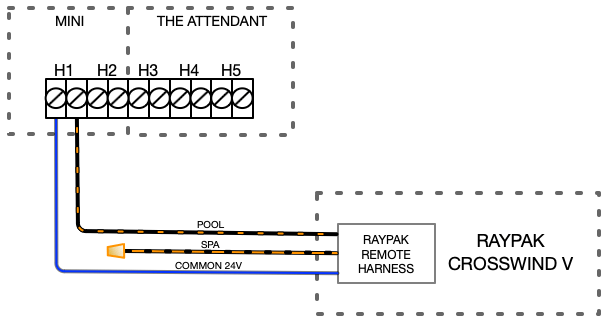

Attach wire nut on the unused wire (ORANGE/BLACK) spa wire.
Install the Raypak remote control harness to the connector on the P7 terminal on the Crosswinds circuit board and turn power ON to the heat pump and The Attendant.
Set heat pump mode to OFF on touch pad. Press UP and DOWN buttons
simultaneously for 3 seconds until REMOTE displays on LCD. (This will
ENABLE remote operation and DISABLE the arrow keys and MODE button.)
Remote Wiring Connections (Heat/Cool Models)
In Heat/Cool models, the 3-wire remote “Pool” terminal can be configured to operate as “Pool Heat”, “Pool Cool” or “Pool Auto”. The default mode for remote pool is “Pool Heat”.
To change this setting enter “Program Menu” by pressing and holding SERVICE + MODE keys simultaneously for 7-10 seconds.
Press SERVICE key until “Remote Pool Mode” is displayed.
Use the UP or DOWN keys to select “Pool Cool”.
After selection is completed, press MODE key to exit the “Program Menu”.
Push the MODE key to select the Pool Mode (Pool Cool) and set the temperature set points to the lowest setting available on the heat pump and set the Spa Mode to the safest highest setting available on the heat pump. The actual set point will be controlled by the remote controller.
Turn “OFF” with MODE key and remove power from the heater.
For 3-wire control, connect the BLUE (common) wire to one side of each Heater port, then connect the ORANGE/ BLACK wire for “SPA (Heat)” operation and the BLACK/ ORANGE wire for the “POOL (Cool)” operation.

Install the Raypak remote control harness to the connector on the P7 terminal on the Crosswinds circuit board and turn power ON to the heat pump and The Attendant.
Activate remote mode in the heater. Press and hold the UP and DOWN arrow keys simultaneously for 3 to 5-seconds.
Wiring and programming on the heat pump in now complete. Finish setup in The Attendant App from Installer Mode.
Programming
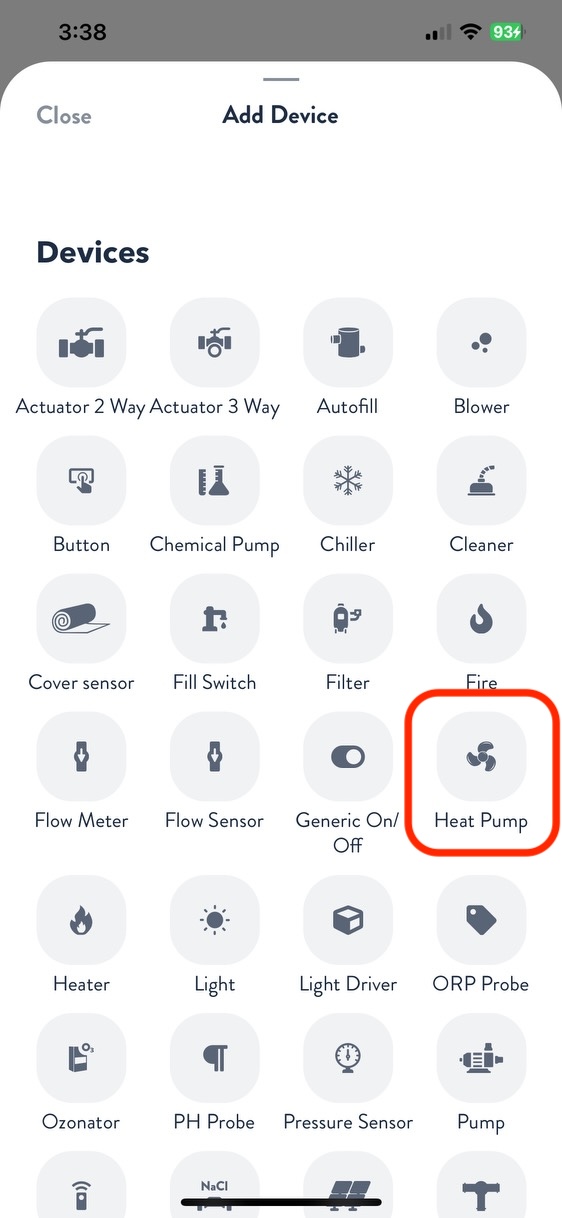
Once in installer mode, go to the Devices tab and press the + button. From the Add Device screen, select Heat Pump.
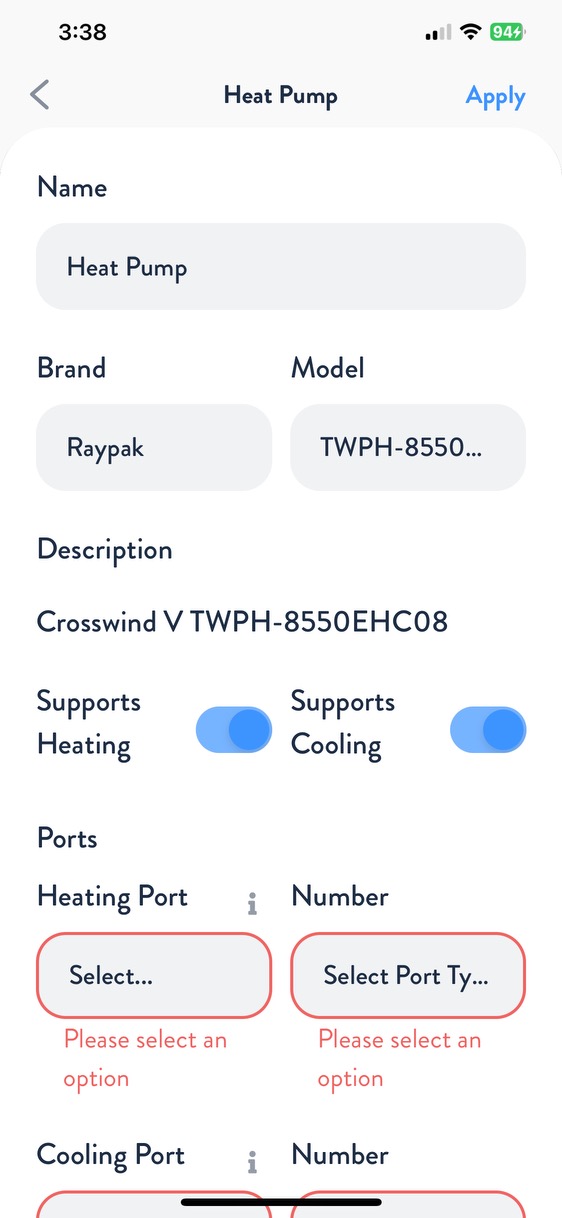
Rename the heat pump, then choose Raypak as the brand and select the applicable model number.
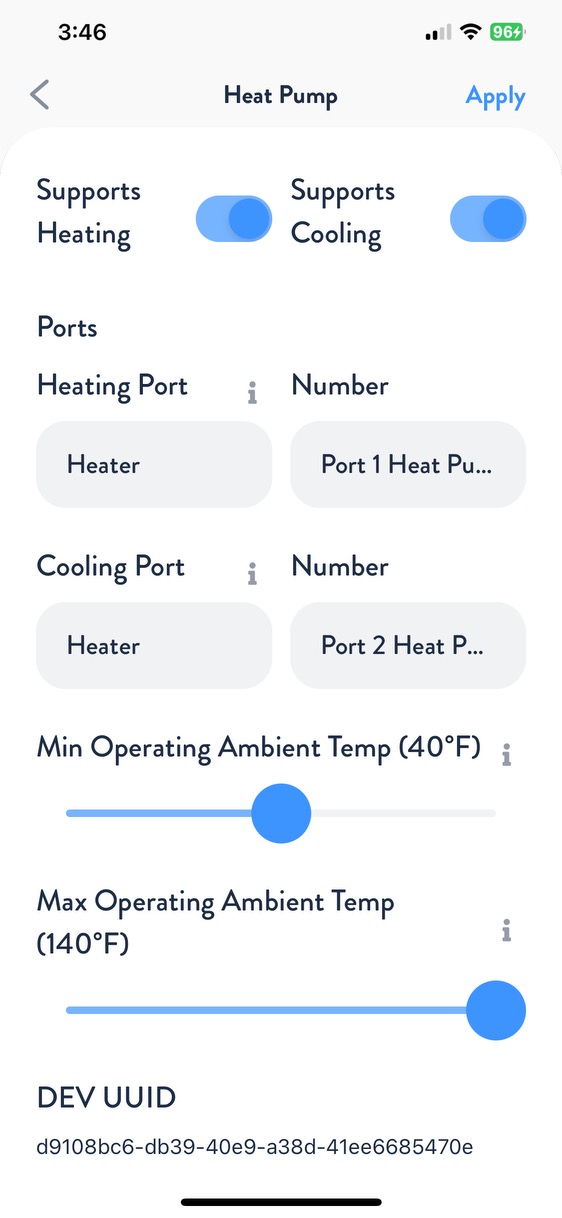
Next, choose the port type and number for both Heating and Cooling (if applicable). Adjust the minimum and maximum operating ambient temperature to match the heater specifications. Press Apply, then navigate to the Flows tab and assign your heater to the appropriate flow. When finished, press Apply and Save.
Your Raypak Crosswinds V is now wired, programmed, and ready to use!