
Pentair UltraTemp heat pumps can be integrated with pool automation systems using either digital Serial RS-485 connections or dry contact / fireman switch connections.
These instructions explain how to connect and configure your UltraTemp heat pump for remote control.
💡 Pro Tip: RS-485 provides more functionality and feedback than dry contacts, so it’s the preferred setup for automated environments.
Serial RS-485 Connection (Recommended)
Serial RS-485 Connection (Recommended)
Using the Serial RS-485 connection gives full communication between your UltraTemp heat pump and automation system. This allows:
- Turning the heat pump ON/OFF remotely
- Setting target water temperature
- Selecting operating modes (Heat Only, Cool Only, Auto)
- Reading and reporting heat pump error codes
Wiring Steps:
- Power Down: Turn off power to both The Attendant and the UltraTemp heat pump.
- Access Heat Pump Control Board: Remove the front left cabinet panel and the electrical service panel.
- Run Wires: Route the RS-485 wiring from The Attendant into the heat pump’s upper electrical compartment.
- Connect Wires:
- Green wire → D- terminal
- Yellow wire → D+ terminal
(Connect these to a BUS port on The Attendant labeled BUS)

- Reassemble & Power Up: Replace the panels and restore power.
- Configure Remote Mode:
- Press MENU SELECT on the heat pump display to locate the Remote Mode screen.
- Use arrows to set the mode to RS-485.
- Once connected, a “ ✱ ” heartbeat will appear on the screen each time data is received.
Dry Contact / Fireman Switch Connection
Dry contact (relay) connections provide basic ON/OFF heat or cool(Not Both) control of the heat pump based on demand from your automation system.
Wiring Steps:
- Power Down: Turn off power to The Attendant and the UltraTemp heat pump.
- Access Control Board: Remove the front left panel and the electrical service panel on the heat pump.
- Run Wires: Bring wires from The Attendant into the heat pump’s electrical compartment.
- Connect Wires:
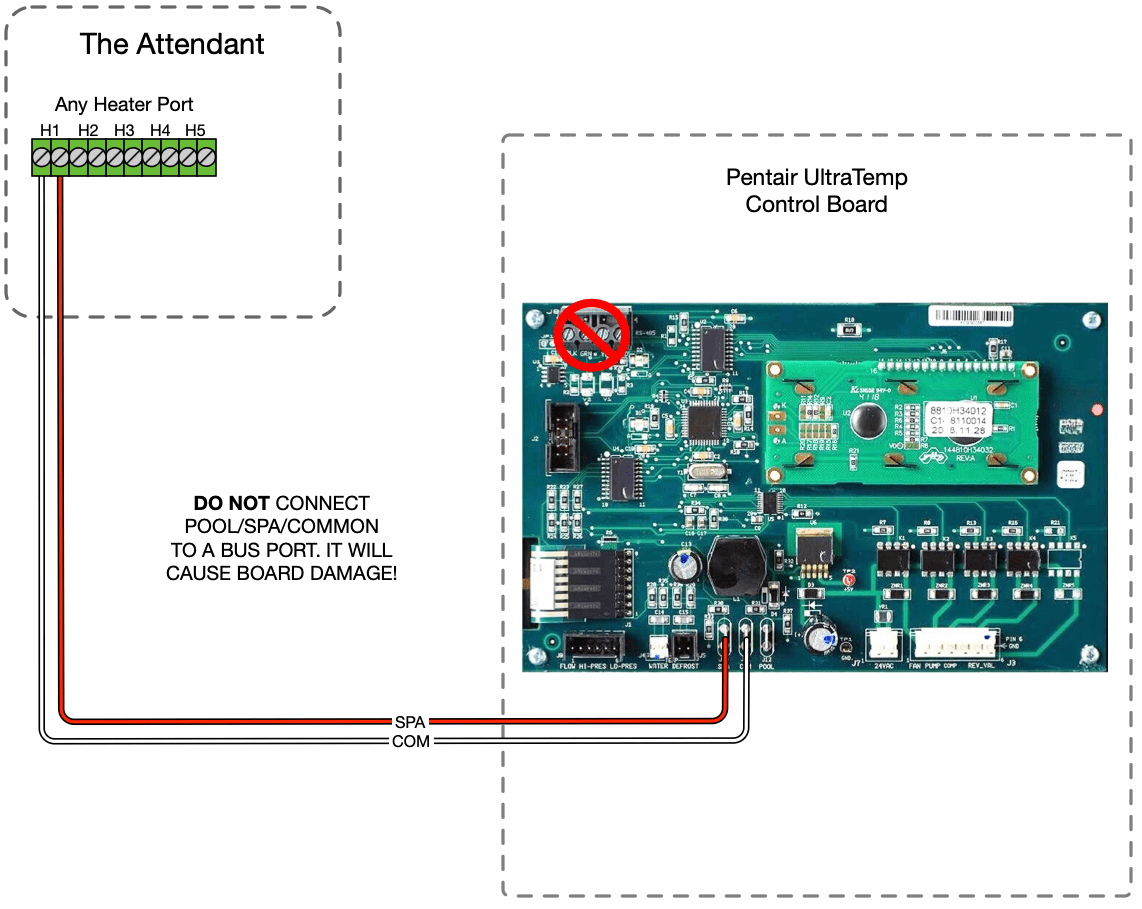
- Connect the heat pump’s SPA and COM remote control terminals using ¼″ spade connectors.
- Connect the other end of those wires to an available Heater port on The Attendant panel.
- Reassemble & Power Up: Replace panels and restore power.
- Configure Relay Mode:
- Press MENU SELECT repeatedly until the Remote Mode screen is displayed. Once displayed, press the UP or DOWN arrows to select RELAY. The last option shown on the display becomes active.
- Press MENU SELECT repeatedly until the Heat/Cool/Auto Mode Screen is displayed. Press the UP or DOWN arrows to toggle between HEAT, COOL and AUTO. Select HEAT or COOL. AUTO is not a valid selection while the heat pump is in Relay Remote mode operation.
Dry contact control is sufficient for basic on/off temperature control, but it won’t provide mode feedback or advanced reporting like RS-485.