
Integrating FlowVis Digital Flow Meter with The Attendant Automation System
At Poolside Tech, we continuously strive to enhance The Attendant pool automation system by integrating innovative solutions. Our latest collaboration with FlowVis introduces a cutting-edge digital flow meter, bringing precision and efficiency to pool management like never before.
What is the FlowVis Digital Flow Meter?
The FlowVis digital flow meter is an industry-leading device designed to provide accurate and reliable flow rate measurements in gallons per minute (GPM).
How Does It Work with The Attendant?
When connected to The Attendant automation system via the Professional Chemistry Card, the FlowVis flow meter seamlessly integrates into your pool’s operational ecosystem. Here’s how it works:
- 4-20mA Signal: The FlowVis device communicates via 4-20mA analog signal, ensuring uninterrupted compatibility with The Attendant’s robust communication protocols.
- User-Friendly Interface: GPM data is displayed intuitively on The Attendant’s Device Status dashboard, making it easy to monitor and adjust settings as needed.
- Custom Alerts: Set alerts with our “Dirty Flow Detection,” ensuring your pool system operates within safe parameters.
Benefits of the Integration
- Improved System Efficiency: Avoid overworking your pool equipment by maintaining optimal flow rates.
- Equipment Lifespan: Increase the lifespan of your equipment by maintaining optimal flow rates, preventing excess wear.
- Enhanced Maintenance Insights: Detect potential issues, such as blockages or leaks, early on.
- Seamless Control: Manage all aspects of your pool, including flow rate, from a single platform.
- Energy efficiency insights: Optimize pump performance by ensuring the correct flow rate for various pool features.
Installation Overview
Required Components:
- Professional Chemistry Board (ATT-CHEM) – Included in units manufactured after 02/2025.
- One of the following options:
- FlowVis FV-D Digital Sensor (ATT-FLOW-SENSOR) – Requires the installation of a 2″ to 8″ H2Flow Meter.
- FlowVis FV-D Digital Sensor with 2″ H2Flow Meter (ATT-FLOW-2).

Wiring:
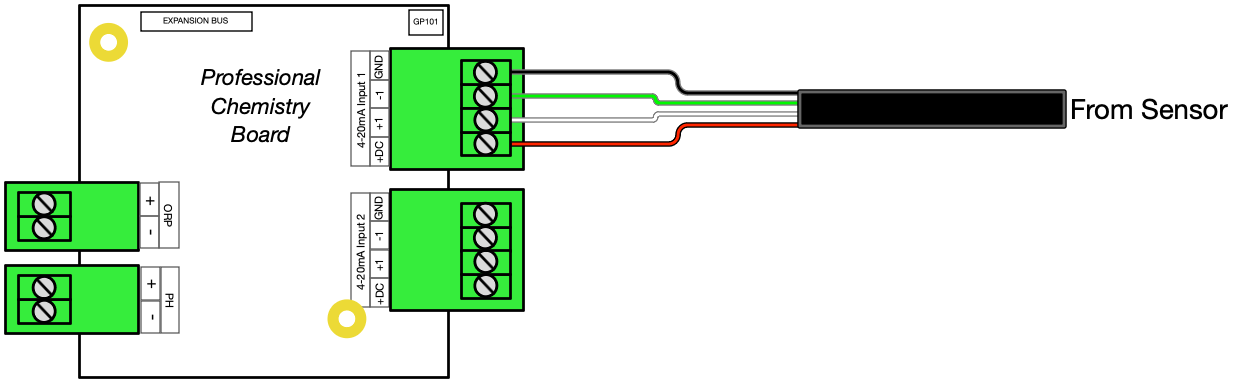
Once the FlowVis Digital Sensor has been installed per the manufacturer’s instructions, it is now time to wire the sensor to ‘The Attendant.
At the end of the digital sensor cable, you’ll find four wires: red, white, green, and black. These wires connect to ‘The Attendant’ via the Professional Chemistry Board. Below is an image and table listing each color wire, its purpose (signal) and where each wire goes.
| FlowVis Cable Color | FlowVis Pin # | Signal | 4-20mA Pin # |
|---|---|---|---|
| Red | Pin 3 | +12V | Pin 1 (+DC) |
| White | Pin 2 | +Sensor | Pin 2 (+I) |
| Green | Pin 1 | -Sensor | Pin 3 (-I) |
| Black | Pin 4 | GND | Pin 4 (GND) |
Connect each color wire from the FlowVis sensor cable to The Attendant using an available terminal block on the Professional Chemistry Board.
Creating the Device in the Poolside Mobile App
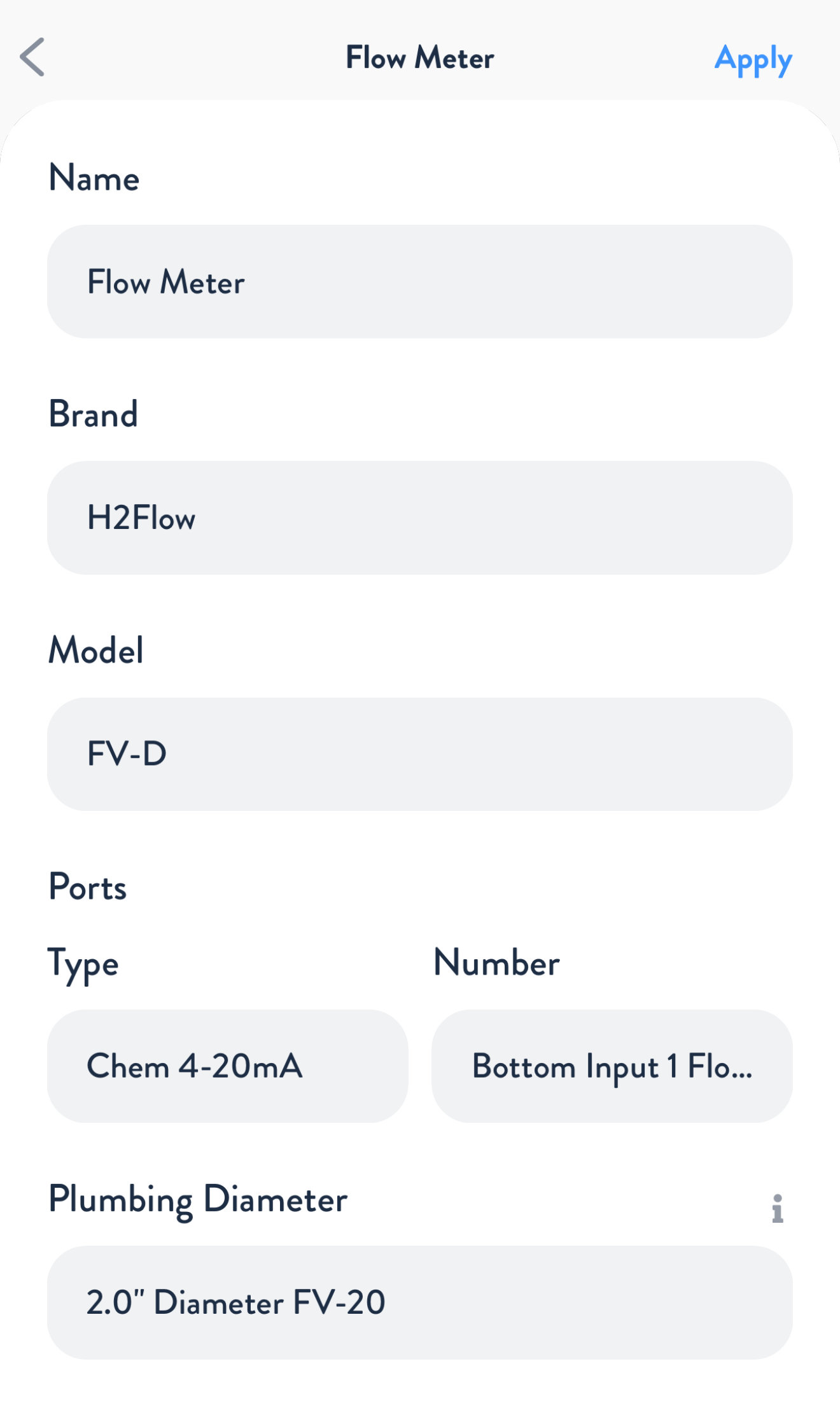
Using the Poolside mobile app, add or edit a Flow Meter device in Installer Mode.
Name: You can use the default name supplied by the app, or customize it.
Brand: H2Flow
Model: FV-D
In the “Ports” section, select “Chem 4-20mA” as the port type, and select the 4-20mA Input number you connected the wiring to.
Plumbing Diameter: Select the plumbing diameter where the FlowVis is installed. Setting the correct value here is crucial to The Attendant calculating and reporting the correct flow rates!
Press Apply and then Save.
Troubleshooting
No Blue LED Light
If the blue LED on the FlowVis meter is not lit (off), this would indicate that the meter is not being powered from The Attendant. Please confirm the wiring connections the terminal block are secure and each is installed to the correct pin.
Sensor/Blue light is flashing
A flashing blue LED indicates that the FlowVis does not have a magnet installed. If your FlowVis model is for a 2.5” (DN65) or smaller, and the blue sensor light is flashing, please install the replacement flapper/indicator that has the magnet.